
Posted on Leave a comment

Understanding Zigbee: A Versatile, Wireless Solution for Smart Homes

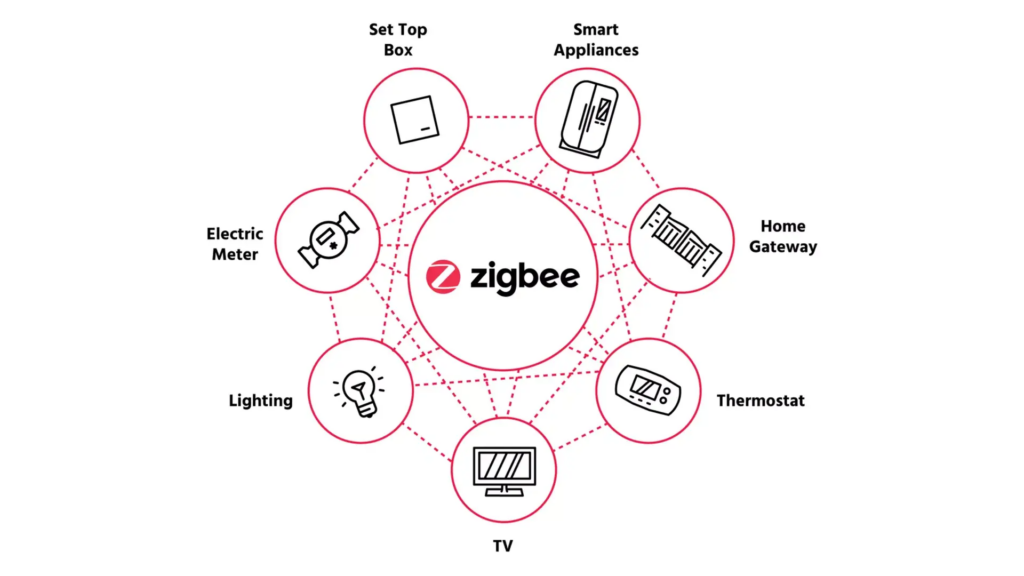
Zigbee has emerged as a popular choice for those looking to create a seamless and efficient network of connected devices.
Zigbee creating a seamless and efficient network of connected devices.

In today’s connected world, smart home technologies are becoming more accessible, and Zigbee is one of the key wireless protocols driving this revolution. If you’re exploring smart home solutions or have heard about devices like light bulbs, or security sensors that can “talk” to each other, then Zigbee is something you should know about. This blog will break down what it is, how it functions, and why it’s a flexible and efficient solution for building out your smart home, whether you use a vendor hub or choose platforms like OpenHAB or Home Assistant

What is Zigbee? 

It is a wireless communication protocol designed for low power, low data rate applications, such as home automation, lighting, and security systems. It’s particularly popular for creating wireless networks that can link a variety of devices, ranging from lights to sensors to locks, and is known for its mesh networking capabilities. 

The primary goal of is to enable smart devices to communicate with each other efficiently, requiring very little power. This makes it ideal for battery powered gadgets that don’t need constant high speed internet connectivity. 

How Does Zigbee Work? 

It operates on the IEEE 802.15.4 standard, using the 2.4 GHz frequency band, the same as Wi-Fi, but with a much simpler and lighter communication protocol. Here’s a breakdown of some of its key characteristics: 

  1. Low Power Consumption: Devices that communicate using it are incredibly energy efficient. Many devices can run for years on a single battery, making them ideal for sensors or remote control applications. 
  1. Short Range (But with a Twist): While a single device might only communicate over a short range (up to 100 meters in ideal conditions), its true strength lies in mesh networking (explained below). 
  1. Mesh Networking: Devices don’t need to communicate directly with a central hub. Instead, they can form a mesh network where each device acts as a relay, passing messages along to other devices. This increases range and ensures that communication is reliable, even if one device is out of direct range from the hub. For example, if a sensor is too far from the central hub, it can communicate with a nearby light bulb, which then relays the signal to the hub. 
  1. Low Data Transfer Rates: Zigbee is not designed for high bandwidth applications like streaming video. It is most effective for sending small packets of data, such as temperature readings or on/off commands for lights. 

The Flexibility of Zigbee: Vendor Hubs or Independent Platforms 

One of the most attractive features is its flexibility. Depending on your preference, you can use it with a vendor’s hub or set up a hub free system on platforms like OpenHAB or Home Assistant

Using Zigbee with a Vendor Hub 

Many popular smart home hubs, such as Tuya, Smart Life, Philips Hue, Amazon Echo Plus, and Samsung SmartThings, use Zigbee to communicate with their devices. These hubs offer user friendly interfaces, making it easy to control a smart ecosystem through a single app. However, there is one caveat: if you use a vendor’s hub, you may be limited to that brand’s ecosystem or require additional integrations to work with devices from other manufacturers. 

Without a Vendor Hub: Home Assistant or OpenHAB 

For tech savvy users looking for more control and customization, these devices can be integrated into opensource platforms like OpenHAB and Home Assistant. Both platforms allow you to set up a more flexible and independent smart home network, free from vendor lock in. By using a Zigbee USB dongle or coordinator, you can directly connect devices to these platforms and automate them according to your preferences. 

Here’s how this setup differs from using a vendor hub: 

  • Interoperability: You can combine devices from different manufacturers without worrying about whether they’re part of the same “ecosystem.” 
  • Customisation: You have full control over your automations and can tweak the system to suit your needs. 
  • Cost Effectiveness: Open-source platforms like OpenHAB and Home Assistant are free, making them an affordable option for those willing to invest time in setup and configuration. 

Zigbee vs. Other Smart Home Protocols 

You might wonder, how does Zigbee stack up against other popular smart home protocols, like Z-Wave or Wi-Fi? 

  1. Zigbee vs. Z-Wave: Both Zigbee and Z-Wave are mesh networks, but Z-Wave operates at a lower frequency (900 MHz), compared to Zigbee, which uses 2.4 GHz. However, Zigbee can support more devices on a single network and has a higher global adoption rate, meaning more available products. 
  1. Zigbee vs. Wi-Fi: While Wi-Fi is common in homes, it’s not as efficient for low-power devices, like sensors or smart bulbs, because of its high energy consumption and more complex protocol. Zigbee is built for this exact purpose simple, low power communication that doesn’t hog your network bandwidth. 

Conclusion 

Zigbee is a robust, flexible wireless protocol that’s ideal for building a reliable and scalable smart home network. Whether you’re just starting out with a few smart lights or building a complex home automation system with sensors, cameras, and thermostats, it offers both convenience and flexibility. You can either use a vendor’s hub for a plug and play experience or go the opensource route with platforms like OpenHAB and Home Assistant for full control of your smart home. 

By understanding how Zigbee works and its unique mesh networking capabilities, you’ll be well on your way to creating a smart home that fits your needs perfectly. 
Posted on Leave a comment

The Importance of Local Control for Smart Homes: Why It Matters More Than Ever

Offline Is the New Smart: Why Local Control Matters More Than Ever

In today’s smart home landscape, convenience often overshadows long term reliability. While cloud connected devices promise effortless automation, lighting control, security, and energy management, they come with a hidden risk: dependency on external servers.

Local control for smart homes puts you back in charge. Your devices operate on your local network without needing constant internet access or third-party cloud services. This approach ensures your smart home keeps working even during internet outages, company shutdowns, or subscription changes.

If you’re building or upgrading a smart home in South Africa, where load shedding and connectivity issues are common, prioritising local control vs cloud smart home setups is essential for stability and peace of mind.

The Risks of Cloud Dependent Smart Home Devices

Many popular smart home gadgets rely on manufacturer cloud servers to function. When those services end, your investment can become worthless. Here are well known examples:

  • Revolv Hub (2016): Nest acquired and shut down the service, turning expensive hubs into “paperweights” overnight.
  • Logitech Harmony Link: Service discontinued, rendering the remote and hub useless.
  • Iris by Lowe’s (2019): The entire platform was shut down, leaving users scrambling for alternatives.
  • Wink Hub (2020): Switched to a mandatory subscription model, forcing users to pay monthly for features that were previously free.

These cases highlight a key problem: with cloud dependent systems, you don’t truly own your smart home. Recent widespread cloud outages (such as AWS disruptions) have further shown how even major platforms can leave devices unresponsive.

Key Benefits of Local Control for Smart Homes

Choosing local control delivers clear advantages over cloud reliant alternatives:

  1. Independence and Longevity — Your devices continue working even if the manufacturer goes out of business or stops support. No more risk of sudden shutdowns or forced subscriptions.
  2. Enhanced Privacy and Security — Data stays within your home network, reducing exposure to hacks, data breaches, or unauthorised access by third parties. This is especially important for security cameras, locks, and personal routines.
  3. Faster Response Times (Lower Latency) — Commands execute instantly on your local network instead of routing through distant servers. Automations feel more responsive and reliable.
  4. Offline Functionality — Your smart home remains operational during internet outages or load shedding — critical for lights, security systems, and climate control in South Africa.
  5. Greater Customisation and Control — Integrate devices freely without corporate restrictions, using opensource tools tailored to your needs.

An offline smart home built on local control is simply more resilient, private, and future proof.

Best Local Control Smart Home Solutions and Technologies

Several excellent options prioritise local operation and work well together:

  • Home Assistant — The leading opensource platform. It runs locally (e.g., on a Raspberry Pi or mini PC) and supports thousands of devices without cloud dependency. Perfect for full home automation.
  • openHAB — Another powerful opensource home automation platform with strong local focus and extensive customisation.
  • Zigbee Protocol — A reliable, low power mesh network that allows devices to communicate directly with each other locally. Many Zigbee devices work seamlessly with Home Assistant, even without internet.
  • Tasmota Firmware — Flash this opensource firmware onto compatible ESP based plugs, switches, and sensors for true local control via MQTT or HTTP. It integrates beautifully into Home Assistant or openHAB.

These tools let you create a robust, local control smart home that avoids vendor lock in while supporting popular protocols like Zigbee and Z-Wave.

Pro Tip: Start with a dedicated hub (like a Home Assistant Yellow or a small server) and add Zigbee compatible devices for the best local performance.

Conclusion: Make Local Control Your Smart Home Priority

As smart home technology evolves, the risks of cloud dependency are becoming clearer. Local control for smart homes delivers unmatched reliability, privacy, security, and speed — without monthly fees or fear of obsolescence.

If you’re in South Africa and want a smart home that works reliably through load shedding and beyond, focus on local first solutions like Home Assistant + Zigbee. You’ll enjoy a faster, more private, and truly yours smart home.

Ready to build or upgrade? Explore local control friendly devices and hubs in our store, or contact us for personalised advice on setting up a resilient smart home system.


What is local control in a smart home? Local control means your smart devices and automations run on your home network without needing cloud servers or constant internet.

Is local control better than cloud for smart homes? Yes for most users who value privacy, reliability, and longevity. Cloud offers easier remote access but introduces risks of downtime, data sharing, and service discontinuation.

Does Home Assistant require internet? No — core automations and local device control work offline. Internet is only needed for optional remote access or updates.

Can Zigbee devices work without internet? Yes. Zigbee creates a local mesh network, so devices communicate directly even if your internet is down.

How do I start with local control smart home in South Africa? Begin with Home Assistant on a Raspberry Pi, add a Zigbee coordinator (like Sonoff or Conbee), and choose devices that support local protocols. We stock compatible hardware to make it easy.